Thoughts, notes & the occasional opinion.

Category: Software

Manually removing TrueNAS Boot Environments

TrueNAS automatically retains copies of previous boot environments following updates and should automatically delete them if there are space constraints. However, in my experience, it rarely does and attempts to manually delete them via the GUI frequently fail with no given or logged cause.
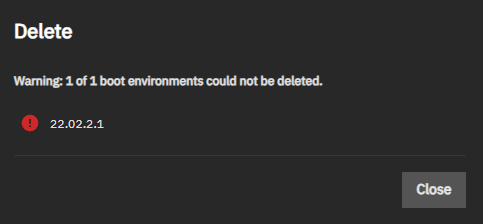
Thankfully, and if you are brave enough, you can manually delete old and redundant boot environments via the CLI.

As always, this post is provided AS IS and you use it at your risk. If your TrueNAS box turns into a lump of glowing slag, it’s on you.

Listing the Boot Environments

Although you may view the current Boot Environments via System > Boot, the most detailed information via the shell. Open a shell via System > Shell. Enter the command zfs list -r boot-pool/ROOT to generate a list of all current boot environments.

Don’t be surprised if you get a list far larger than that shown in the TrueNAS GUI. The generated list will include subsets for each version of TrueNAS installed.

For example, running zfs list -r boot-pool/ROOT on my TrueNAS will return:

root@nyx[~]# zfs list -r boot-pool/ROOT
NAME USED AVAIL REFER MOUNTPOINT
boot-pool/ROOT 8.36G 17.8G 96K none
boot-pool/ROOT/25.04.2.3 2.78G 17.8G 176M legacy
boot-pool/ROOT/25.04.2.3/audit 164K 17.8G 5.02M /audit
boot-pool/ROOT/25.04.2.3/conf 7.15M 17.8G 7.15M /conf
boot-pool/ROOT/25.04.2.3/data 100K 17.8G 360K /data
boot-pool/ROOT/25.04.2.3/etc 7.52M 17.8G 6.55M /etc
boot-pool/ROOT/25.04.2.3/home 0B 17.8G 124K /home
boot-pool/ROOT/25.04.2.3/mnt 96K 17.8G 96K /mnt
boot-pool/ROOT/25.04.2.3/opt 96K 17.8G 96K /opt
boot-pool/ROOT/25.04.2.3/root 72K 17.8G 144K /root
boot-pool/ROOT/25.04.2.3/usr 2.56G 17.8G 2.56G /usr
boot-pool/ROOT/25.04.2.3/var 36.8M 17.8G 3.50M /var
boot-pool/ROOT/25.04.2.3/var/ca-certificates 96K 17.8G 96K /var/local/ca-certificates
boot-pool/ROOT/25.04.2.3/var/lib 27.5M 17.8G 27.2M /var/lib
boot-pool/ROOT/25.04.2.3/var/lib/incus 96K 17.8G 96K /var/lib/incus
boot-pool/ROOT/25.04.2.3/var/log 4.77M 17.8G 4.54M /var/log
boot-pool/ROOT/25.04.2.3/var/log/journal 4.46M 17.8G 4.46M /var/log/journal
boot-pool/ROOT/25.04.2.4 2.78G 17.8G 176M legacy
boot-pool/ROOT/25.04.2.4/audit 172K 17.8G 5.50M /audit
boot-pool/ROOT/25.04.2.4/conf 7.15M 17.8G 7.15M /conf
boot-pool/ROOT/25.04.2.4/data 108K 17.8G 360K /data
boot-pool/ROOT/25.04.2.4/etc 7.54M 17.8G 6.55M /etc
boot-pool/ROOT/25.04.2.4/home 0B 17.8G 124K /home
boot-pool/ROOT/25.04.2.4/mnt 96K 17.8G 96K /mnt
boot-pool/ROOT/25.04.2.4/opt 96K 17.8G 96K /opt
boot-pool/ROOT/25.04.2.4/root 8K 17.8G 152K /root
boot-pool/ROOT/25.04.2.4/usr 2.56G 17.8G 2.56G /usr
boot-pool/ROOT/25.04.2.4/var 36.0M 17.8G 3.51M /var
boot-pool/ROOT/25.04.2.4/var/ca-certificates 96K 17.8G 96K /var/local/ca-certificates
boot-pool/ROOT/25.04.2.4/var/lib 27.5M 17.8G 27.2M /var/lib
boot-pool/ROOT/25.04.2.4/var/lib/incus 96K 17.8G 96K /var/lib/incus
boot-pool/ROOT/25.04.2.4/var/log 4.04M 17.8G 5.21M /var/log
boot-pool/ROOT/25.04.2.4/var/log/journal 3.77M 17.8G 3.77M /var/log/journal
boot-pool/ROOT/25.04.2.6 2.80G 17.8G 176M legacy
boot-pool/ROOT/25.04.2.6/audit 6.20M 17.8G 5.50M /audit
boot-pool/ROOT/25.04.2.6/conf 7.15M 17.8G 7.15M /conf
boot-pool/ROOT/25.04.2.6/data 848K 17.8G 360K /data
boot-pool/ROOT/25.04.2.6/etc 7.47M 17.8G 6.55M /etc
boot-pool/ROOT/25.04.2.6/home 252K 17.8G 124K /home
boot-pool/ROOT/25.04.2.6/mnt 96K 17.8G 96K /mnt
boot-pool/ROOT/25.04.2.6/opt 96K 17.8G 96K /opt
boot-pool/ROOT/25.04.2.6/root 340K 17.8G 152K /root
boot-pool/ROOT/25.04.2.6/usr 2.56G 17.8G 2.56G /usr
boot-pool/ROOT/25.04.2.6/var 38.7M 17.8G 4.31M /var
boot-pool/ROOT/25.04.2.6/var/ca-certificates 96K 17.8G 96K /var/local/ca-certificates
boot-pool/ROOT/25.04.2.6/var/lib 27.5M 17.8G 27.2M /var/lib
boot-pool/ROOT/25.04.2.6/var/lib/incus 96K 17.8G 96K /var/lib/incus
boot-pool/ROOT/25.04.2.6/var/log 6.68M 17.8G 5.31M /var/log
boot-pool/ROOT/25.04.2.6/var/log/journal 544K 17.8G 544K /var/log/journal

In the example above, there are three distinct boot environments: 25.04.2.3, 25.04.2.4 and 25.04.2.6

Deleting a Boot Environment

!! IMPORTANT !!

  1. Make a backup of your TrueNAS configuration before proceeding. See https://www.truenas.com/docs/scale/gettingstarted/configure/setupbackupscale/#backing-up-the-system-configuration
  2. Make a note of your current boot environment name and do not delete it.
  3. I recommend retaining at least one previous known good boot environment.

From the list of boot environments (see above), enter the command zfs destroy -r boot-pool/ROOT/boot_name where boot_name is the principal boot name to delete. For example, if I wanted to delete the boot environment named 25.04.2.3 the command would be:

zfs destroy -r boot-pool/ROOT/25.04.2.3

At the time of writing, there is no confirmation shown when deleting a boot environment. To check if an environment has been deleted, use zfs list -r boot-pool/ROOT command

Final Thoughts

As a general sanity check, I always restart a TrueNAS instance once I have deleted any boot environments. If your TrueNAS box fails reboot, then you’ve probably managed to delete your current boot environment..

Renaming a TrueNAS storage pool where the name contains spaces or special characters

Renaming a TrueNAS pool is fairly simple, but it gets a little bit more complicated if the pool name contains spaces or other special characters. Pool names really should contain neither of these and arguably TrueNAS shouldn’t allow you to enter them in the first place.

If you’ve been a bit dense (i.e. like me), and you have used spaces, then you may have experienced some glitches with pool names if they contain spaces. In brief, you cannot import a pool by using its’ name if it contains spaces. You can import if you know the pool’s Id. These are steps I used to rename my pool from Pool 1 – 1TB Drives to archive.

As always, these notes are provided AS IS. and you use them at your risk. This post relates to TrueNAS version 25.04.2.4 which is the version I was using at the time of writing. You may need to check documentation if you are using a different version of TrueNAS.

Step 1: Backup & Preparation

Backup your TrueNAS configuration via the GUI – see https://www.truenas.com/docs/scale/25.04/gettingstarted/configure/setupbackupscale/

Wherever possible, disconnect any remote devices or users that are accessing the pool.

Step 2: Export / Disconnect Pool

Important: the export/disconnect of a pool will remove all references to services that use that pool (shares, containers, virtual machines etc.) If you wish to persist any of these, move them to another pool first.

In TrueNAS, got to Storage and select the pool in question. Then click on the Export/Disconnect button.

Check/tick the options Delete saved configuration from TrueNASand Confirm Export/Disconnect.

Then click on the Export/Disconnect button.

Step 3: Determine the Pool Id

Still within the Storage Dashboard, click on Import Pool

Click on the Pool drop down and you should see the pool you just exported. It’s name should be something like VerbosePoolName | SomeLongNumber. So, for me it was:

Pool 1 - 1TB Drives | 14645091355551590814

The value of SomeLongNumber is the pool Id. Either write down or copy the number – I was able to copy the text directly.

Step 4: Renaming the pool

In TrueNAS open a shell by going to System > Shell.

Import the pool by using the -f parameter to specify the pool Id. The command format is:

 zpool import -f pool_id new_pool_name 

So, for me to rename my pool to archive, I used:

zpool import -f 14645091355551590814 archive

You should then get a message along the lines of:

cannot mount '/archive': failed to create mountpoint: Read-only file system
Import was successful, but unable to mount some datasets

If you see this – despite the first message – the import was successful. Check the status using zpool status new_pool_name, for example:

zpool status archive

You will get an output that should contain the text state: ONLINE. For example:

zpool status archive
pool: archive
state: ONLINE
scan: scrub repaired 920K in 01:49:24 with 0 errors on Sun Jan 7 15:05:27 2024
...

To complete the process export using the command zpool export new_pool_name

zpool export archive

Step 5: Importing back into TrueNAS

Go to Storage and then click on Import Pool

Select the pool from the drop down menu and then click on Import. Depending on the size and complexity of the pool, this may take a few minutes to complete.

Once the import has completed, the Storage Dashboard will automatically update to show the imported and renamed pool.

Final Notes

If you were running Apps or Containers on the renamed pool – for example Docker – you can import the apps by going to Apps > Configuration > Choose Pool. However, you may need to manually update any configuration paths to reflect the new pool name.

Configuring urBackup Client on Linux

Configuring urBackup client on Linux is done via the shell (surprise!) but it is quick and easy once you know where to start.

To avoid diving into urBackup’s dense administration manual, these are my quick tips for configuring urBackup client in Linux. All the examples below were tested using urBackup client v2.5.26.0 running on Ubuntu 24.04.3 LTS.

Where to start?

Outside of installation and removal, urBackup client is managed through the command line utility urbackupclientctl. Through this utility you may get configure backup paths, get the current status, start (not recommended) and restore from backups.

View Available Commands

To view available commands, simply enter urbackupclientctrl in shell. The output will be something like this:

USAGE:

urbackupclientctl [--help] [--version] <command> [<args>]

Get specific command help with urbackupclientctl <command> --help

urbackupclientctl start
Start an incremental/full image/file backup

urbackupclientctl status
Get current backup status

urbackupclientctl browse
Browse backups and files/folders in backups

urbackupclientctl restore-start
Restore files/folders from backup

urbackupclientctl set-settings
Set backup settings

urbackupclientctl reset-keep
Reset keeping files during incremental backups

urbackupclientctl add-backupdir
Add new directory to backup set

urbackupclientctl list-backupdirs
List directories that are being backed up

urbackupclientctl remove-backupdir
Remove directory from backup set

Current Client Status

To get the current status of the client, use urbackupclient status.

This will return the current status in JSON format. The most useful information is at the end, namely whether the client is connected to the server (property = internet_connected ), the current connection status (property internet_status) and the configured backup server (property = name).

In the example below, the client is successfully connected to the urBackup server found at the address urbackup.server.address

{
"capability_bits": 69696,
"finished_processes": [{
"process_id": 21,
"success": true
}
...
,{
"process_id": 40,
"success": true
}
],
"internet_connected": true,
"internet_status": "connected",
"last_backup_time": 1761566072,
"running_processes": [],
"servers": [{
"internet_connection": true,
"name": "urbackup.server.address"
}
],
"time_since_last_lan_connection": 3089540882
}

List Backup Directories

To view the current list of directories marked for backup use urbackupclientctrl list-backupdir. In the example below, the directories /etc and /srv will be backed up.

PATH       NAME  FLAGS
---------- ----- ----------------------------------------------
/srv srv follow_symlinks,symlinks_optional,share_hashes
/etc etc follow_symlinks,symlinks_optional,share_hashes

Adding a Directory

To add a directory, use urbackupclientctl add-backupdir -d /path/to/directory

To add the directory /home/myuser directory to backups, the command is:

urbackupclientctl add-backupdir -d /home/myuser

CAUTION: At the time of writing, urbackupclientctl does not check if the target directory exists. If you enter an non-existent path, you are likely to get backup errors.

Removing a Directory

Removing a directory is simple: rbackupclientctl remove-backupdir -d /path/to/directory

To remove the directory /home/myuser from backups, the command is:

urbackupclientctl remove-backupdir -d /home/myuser

Starting a Backup

Top Tip: I strongly recommend always starting manual backups via the urBackup Server web administration.

To manually start a backup from the client, use urbackupclientctl start

Detecting mobile browser in ASP.Net

Detecting mobile browsers can be a bit of pain. Whilst it is relatively easy to get browser information through the User Agent string, it is not such a simple task to identify the client device type. There is no defined property within the user agent field that says I’m a mobile device. User Agent values differ widely between devices and browsers, so it is necessary to use some less than elegant detection code.

I recently added this detection functionality to the Camino CMS Framework, and Calzada’s preferred method is using regular expressions. After some playing, we came up with the following regex:

(?i)(android(?:.+mobile)|applewebkit.+(?:\(KHTML, like Gecko){1}|avantgo|blackberry|blazer|docomo|elaine|fennec|htc|kindle|lge|linux.+armv|mmp|mms(?:.+midp){1}|mobile|mot(?:.+midp){1}|nintendo.+(?:3ds|wii)|nokia|nook|opera(?:.+mini|.+mobi){1}|palm|polaris|phone|ppc|psp|samsung|sec|sony|symbian|tablet|up\.browser|vodafone|wap|webos|windows(?:.+ce|.+mobile){1}|xda|xiino

A simplified ASP.Net detection code would look something like this:

Function IsMobileBrowser() As Boolean
Dim regex As New Text.RegularExpressions.Regex("(?i)(android(?:.+mobile)|applewebkit.+(?:\(KHTML, like Gecko){1}|" & _
"avantgo|blackberry|blazer|docomo|elaine|fennec|htc|kindle|lge|linux.+armv|mmp|mms(?:.+midp){1}|mobile|mot(?:.+midp){1}|" & _
"nintendo.+(?:3ds|wii)|nokia|nook|opera(?:.+mini|.+mobi){1}|palm|polaris|phone|ppc|psp|samsung|sec|sony|symbian|tablet|" & _
"up\.browser|vodafone|wap|webos|windows(?:.+ce|.+mobile){1}|xda|xiino", Text.RegularExpressions.RegexOptions.IgnoreCase)
Return regex.IsMatch(HttpContext.Current.Request.ServerVariables("http_user_agent").ToString)
End Function

There are a couple of key points to bear in mind with this method:

  1. It is not perfect. No matter how you tailor and tweak the regular expression, you are inevitably going to get some false positives and false negatives.
  2. This is not a write and forget function. As the number of mobile devices and manufacturers proliferate, the accuracy of the regular expression will diminish. To compensate, it is necessary to regularly review, test and update where required. To ensure that this is done, this process has been added this to the Camino development lifecycle.
  3. Not all mobiles or mobile users may wish to use mobile variant of a website. Do bear in mind that some tablets have a sufficiently large screen to view the normal version of a website.
I am aware that this is not an elegant nor wholly accurate solution, and there are plenty of programmers out there that will view it as a kludge, but in many ways it is a product of its’ ingredients. Until such time when all browsers will provide a property that simply states I’m running on a mobile device, then this will have to do.

.Net Campaign to kill IE6

I came upon this little gem when I was trawling around for something completely unrelated – as you do. .Net magazine has instigated an online campaign to kill Internet Explorer 6.

I’m always a little wary of online campaigns. Perhaps I’m overly paranoid, but I am inheritently suspicious of any campaign or venture that claims to be beneficial that looks a little too slick and well organised for its’ own good. The campaign website is a custom product with slick, targeted design and content. Then again, you would expect any website directly associated with .net to incorporate a high design element.

I approach IE6 with two different perspectives, and unusually, they nearly cancel each other out.

From my web developer’s perspective, IE6 has always been a complete pain. Its’ complete indifference to standards and the arbritrary way in which it renders HTML/CSS has infuriated and caused significant impact on development schedules. From a purely web perspective and with the benefit of hindsight, IE6 significantly stagnated web development.

From the other perspective, that of the IT Support Guy, it is simply not practical to simply kill off IE6. Firstly, there is still a substantial user base out there. Significant number of businesses still run Windows 2000 on a high proportion of their computers, and their IT departments are unlikely to wish to migrate across to a non-Microsoft browser. This is certainly true at the SME end of the market where computers tend not to be replaced as part of a defined replacement program, but as and when a computer fails beyond economic repair.

Is Microsoft likely to release a version of IE7 for Windows 2000? Not likely. In the eyes of Microsoft, Windows 2000 is a dead operating system. It has been superseded not once, but twice. The only option here is to upgrade or replace any Windows 2000 PC. Not a practical or viable option in the SME arena; a computer works until it drops dead.

One suggestion has been that Windows 2000 users simply migrate to another browser like Mozilla Firefox or Opera. For the casual home user, this is eminently doable, but for business users, things are not so clear cut.

There are some applications that require Internet Explorer to work, or utilise within one of their own components. I know of one Oracle/Java web application that would only work properly in Internet Explorer – kind of curious since it was Java based. There is a high market penetration of web-based applications that exploit the integrated security model within Internet Explorer, Sharepoint being an ideal example of one.

IE6 is also remotely and centrally manageable via Group Policies. In any corporate network, this is a valuable management function and something that it still not available in IE’s competitors. Its’ updates may also be centrally managed (WSUS) and monitored. IE, whatever its’ incarnation and foibles, is an enterprise-level web browser.

Internet Explorer has also moved on. We are now at version 8, which is a marked improvement over IE7 and an almost quantum leap up from IE6. Sadly though for all its’ improvements IE8 maintains the Microsoft tradition of its own unique interpretation of W3C standards.

I am no fan of IE6, and in most circumstances I would like to see it gone but the pragmatist says this is wishful thinking. This campaign, whilst with an admirable intent, will not get rid of it no matter who is involved or how many. There are simply too many economic and operational constraints involved. IE6 will only be dead and forgotten when Windows 2000 is, and given its’ longevity that may be for some time yet.

Internet Explorer 8

Internet Exploder Explorer 8 has finally arrived, and unlike the Beta version, it hasn’t crashed my computer. Yet.

Even 5 years ago, the arrival of a new browser was a big event. Nowadays, with the presence of Firefox, Safari and Chrome, its’ release is a little bit of an anticlimax. One hopes that that IE8 will be the browser equivalent of Windows 7: good software as it should have been in the first place. I’ve had too many “interesting” experiences with IE7 over the last couple of years.

So why, the fuss. Well, I’m not going to repeat or perform an in-depth review of IE8. There are plenty of other websites out there doing that and I simply haven’t spent that much time with it yet. I’m looking forward to IE8 as it finally promises a browser from Microsoft that it is in some way consistent and compliant with various web standards. As many web designers/developers out there will tell you, the CSS rendering in previous versions of IE7 is either fundamentally broken, wrong or just plain inconsistent. I have spent far too much time making websites IE friendly with the resultant CSS stylesheets being a discordant mess.

This is not to say that IE is the the only perpetrator out there. My favoured browser, Mozilla Firefox, still doesn’t pass the ACID3 test. Neither does Google Chrome. I haven’t tested in Safari as my patience with Apple software evaporated many moons ago. I can honestly say that I haven’t use Opera in many years.

Consistency has actually improved over the past decade though. I can remember back to 2000/1 when the standard practice at the company I was then working for was to develop separate stylesheets for each browser. Each website would programmatically detect the user’s browser and return the corresponding stylesheet. Thankfully, things have moved on. Back then, we only realistically worried about Internet Explorer and Netscape Navigator (remember that?). Now we have a diverse range of browsers, and importantly, host operating systems and hardware platforms.

So, back to Internet Explorer 8. I will continue to play with it over the next couple of weeks, and I will post an update with my various comments and opinions in the near future. Will it ever replace Firefox? No. I am currently well and truly sold on the sheer extensibility of Firefox. I would be completely lost without extensions like PDF Download and Download StatusBar. If I’m honest, usage of IE8 will probably be restricted to Windows Update and the occasional download from Microsoft that requires a Windows Genuine Authentication check.

Toolkit: Virtual CloneDrive

As someone who uses ISO files on an almost daily basis, a tool like SlySoft Virtual CloneDrive is a brilliant utility that allows the easy mounting of any ISO file as local disk drive. I’ve used several similar utilities over the years, but this one is the best I’ve used yet. It has been installed on a variety of PCs including my venerable Thinkpad, and I have yet to experience any problems.

Virtual CloneDrive is a free download available through the SlySoft website at http://www.slysoft.com/en/virtual-clonedrive.html.

As usual, you use Virtual CloneDrive at entirely your own risk.

© 2026 Alexander John

Theme by Anders NorĂ©nUp ↑